

















Industry Trends & Market Overview
The global in‑vehicle smart connectivity market was valued at approximately USD 62.6 billion in 2024, and is projected to exceed USD 132 billion by 2034 at an 8.9% CAGR. As CarPlay and Android Auto become standard, demand for TS18 Android Car upgrades continues to rise. Many drivers now prefer a wireless CarPlay upgrade over cumbersome wired connections, significantly enhancing convenience and safety.Technical Deep Dive: Why the TS18 Android Car Connection Is Unstable
- Wi‑Fi & Bluetooth coexistence interference: Bluetooth A2DP offload can conflict with Wi‑Fi usage, causing wireless Android Auto disconnections.
- Wi‑Fi scan throttling issues: Android system defaults that limit Wi‑Fi scan frequency may impair stable connectivity. Disabling this often resolves connectivity issues.
- Hotspot frequency switching errors: Switching between 5GHz Wi‑Fi and LTE hotspots can trigger disconnects or crashes on the TS18 unit.
- Restricted firmware permissions: Stock TS18 firmware often blocks USB debugging and debug modes, limiting custom repair and configuration options.
Fast Remote Repair Workflow for TS18 Android Car
- Remote system diagnostics: collect TS18 firmware version, Android Auto version, Wi‑Fi/Bluetooth settings, and LTE module info.
- Factory reset or remote flash of official Android 12 ROM if needed.
- Disable conflict settings: Bluetooth offload, Wi‑Fi scan throttling, system background power saving.
- Network optimization: enable stable wifi hotspot (5GHz) or LTE connections.
- Pair and test wireless CarPlay or Android Auto, verifying stable connectivity throughout.
Comparison: GT6 Pro vs Crystal S9 for TS18 Android Car Upgrade


| Device | Benefits | Ideale per |
|---|---|---|
| GT6 Pro | Fast boot, full features, broad compatibility | Functional stock screen requiring upgrade |
| Crystal S9 | High visual clarity, premium interaction | Low-quality original screen with high visual demand |
Customer Case Studies
John (USA): On a Toyota Sienna TS18 head unit, he downgraded Android Auto to v13.7 and disabled Bluetooth offload. After installing GT6 Pro, he enjoyed uninterrupted CarPlay for over two hours. Sophie (Munich, Germany): Switched to Crystal S9 replacing the TS18 screen—experienced better color quality, fluid interface, and stable CarPlay connection throughout. Mr. Wang (Shanghai): Reduced delay issues with TS18 head unit and Android phone by installing GT6 Pro and HDMI IN. Playback, app response, and Android Auto performance improved markedly.Setup Guide & FAQ
- Insert GT6 Pro and connect to car’s HDMI port and power.
- Enable Split-Screen Mode under Settings → Display.
- Enable Night Theme for low-light visibility.
- Use Google Maps + Spotify in split-screen mode.
- Switch HDMI input via Lighting menu when external device is connected.
- How to enable HDMI IN/OUT on GT6 Pro?
- Use HDMI IN for video input and HDMI OUT to route to car screen. Use Lighting settings to switch input.
- What if OTA update fails on Crystal S9?
- Download firmware to TF card, then update offline via Settings → Update → Offline Firmware.
- How to reduce audio latency on Android Auto?
- Disable Bluetooth audio codec optimization and ensure stable hotspot before re-pairing.
- Night mode and brightness inconsistent?
- Use built-in Night Theme—avoid TS18 native mode due to bugs.
- Is data privacy safe during remote repair?
- FixMyDash never accesses private data. Logs are transparent and factory reset is supported post-upgrade.
Android Auto Error Screenshot Explanation
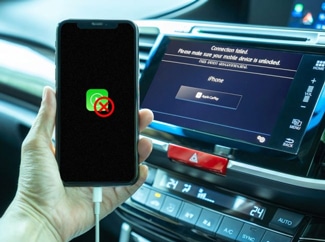
Related Technology & News Updates
- Sony once tested a PS4 controller with biometric sweat sensors—capable of detecting user stress—but discontinued the prototype in final production. :contentReference[oaicite:1]{index=1}
- Microsoft fully reversed its Xbox One always-online DRM policy following customer backlash, allowing used game resale and eliminating 24‑hour connectivity requirements. :contentReference[oaicite:2]{index=2}
